
The challenge: a whole platform, used as a spreadsheet
A UK hosting provider running its own and its clients’ bare-metal servers across multiple data centres was paying for EasyDCIM — but using it for just two things: a list of servers and a safe place for IPMI logins. That meant a separate system to license, secure and log into, with the client and service details it needed living over in WHMCS. Staff switched between the two dozens of times a day to answer one simple question: which box is this, where is it, and how do I get into it?
The solution: build exactly what’s used, where it’s used
Rather than replace one heavyweight DCIM with another, we designed a focused WHMCS addon around the jobs the team actually did: find a server, see where it lives, open its management console, and know whether it’s up. Because it lives inside WHMCS, every client server links straight to its customer and billing service — and admins get it with their existing WHMCS logins and roles, with nothing new to host.
A closer look inside
Six capabilities, each scoped to a real daily task — and built so the secure path is the only path.
Server inventory
Internal and client servers in their own tabs, each with a brand logo, model, hostname and IP, data centre, rack position and a management button labelled by vendor — iDRAC, iLO or IPMI. Decommissioned kit hides until you ask for it.
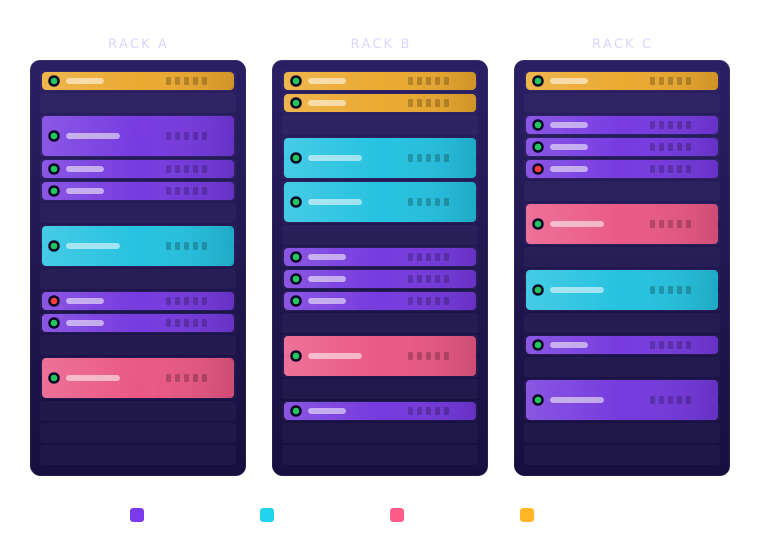
Rack elevations
Every data centre draws its racks as elevation diagrams, devices coloured by brand. Saving a server into an occupied or out-of-range slot is rejected with a message naming the device already there.
Credentials vault
Management passwords are encrypted with WHMCS’s own encryption and never rendered into page HTML. Revealing one is a CSRF-protected request that requires the right role, auto-hides after 30 seconds and writes an audit entry.
Role permissions
Four levels — none, view, reveal and edit — mapped onto existing WHMCS admin roles. Every action declares the level it needs and the server enforces it; hiding a button is never the only protection.
Live status
The WHMCS cron checks each device by ping or TCP port on a configurable interval, inside a time budget so it can never stall billing. Ups and downs land in the dashboard’s latest activity, attributed to the system or the admin who checked.
Client self-service
Link a client server to its WHMCS service and an "Open IPMI" panel appears on the client’s product page — only for the owner, only while the service is active, and never exposing credentials, notes or rack locations.
Engineered like infrastructure
A tool that holds the keys to every server can’t be fragile. DCIM Manager is server-rendered PHP with no build pipeline and no external CDNs; every state-changing request carries a CSRF token; management URLs are validated so nothing but http(s) can be saved; all output is escaped and every query goes through WHMCS’s query builder. Its core logic — rack fit and overlap, permission levels, validation, status handling and service linking — is covered by PHPUnit tests, and it shipped in small, iterative releases shaped by the team using it day to day.
The outcome
The EasyDCIM licence is gone, and the data-centre estate now lives in the same system as the customers and invoices it serves.
One less platform to license, patch and secure — and a tool shaped exactly around how the team works.
Find any server in seconds, open its console in one click, and see at a glance what’s down — all without leaving WHMCS.
Direct, secure access to their own server’s IPMI from the client area — no ticket, no waiting.